Table of Contents
INTRODUCTION
State management in stateless web protocols is a challenge every team faces eventually. During a recent engagement with a client in the Real Estate technology sector, we were tasked with modernizing a property listing platform. The core requirement was a multi-step “wizard” interface allowing agents to upload high-resolution property images in step one, and add metadata (tags, descriptions, room types) in step two.
The architecture relied on Razor Pages for server-side rendering. We encountered a situation where the image filenames—generated and stored temporarily in cloud storage during the first step—needed to be passed silently to the second step without writing to the primary database until the final submission. The developers attempted to bind a List<string> directly to a single hidden input field to preserve this state.
The result was data loss. Instead of passing the file names, the system passed the object type name, breaking the workflow. This specific challenge—how to persist a collection of strings in a hidden HTML structure—inspired this article. It highlights the importance of understanding how ASP.NET Core Model Binding interacts with HTML form data.
PROBLEM CONTEXT
The application was a high-traffic SaaS platform designed for property management. The specific module in question was the “New Listing Wizard.” The goal was to provide a seamless user experience where users could upload files via AJAX, receive a list of secure identifiers (filenames) back, and move to the next screen to annotate those images.
The backend model looked essentially like this:
public class PropertyListingModel
{
    public int PropertyId { get; set; }
    public string Description { get; set; }

    // The collection we needed to persist across HTTP requests
    public List<string> ImageReferences { get; set; }
}
When the user navigated from the “Upload” page to the “Details” page, the ImageReferences list was populated. However, if the user triggered a server-side validation error on the “Details” page (e.g., missing description) and the page reloaded, or if the data needed to be posted to a final “Summary” step, that list of strings had to be included in the form POST payload. If it wasn’t preserved in the form, the list would become null, and the association between the listing and its images would be lost.
WHAT WENT WRONG
The initial implementation attempted to use the standard Tag Helper syntax for a single field, assuming the framework would auto-magically serialize the collection.
The code looked like this:
<!-- INCORRECT IMPLEMENTATION -->
<input type="hidden" asp-for="PropertyListing.ImageReferences" />
When the page rendered, the value of the input field was not a comma-separated list of files. Instead, the HTML output looked like this:
<input type="hidden"
       id="PropertyListing_ImageReferences"
       name="PropertyListing.ImageReferences"
       value="System.Collections.Generic.List`1[System.String]" />
The technical failure: The HTML value attribute expects a simple string. When you pass a complex object (like a List) to it without specific instructions, .NET simply calls ToString() on the object. For a generic list, the default ToString() method returns the type name, not the content.
Consequently, on the next form submission, the Model Binder tried to parse the string “System.Collections.Generic…” back into a List, which failed silently or resulted in an empty list.
HOW WE APPROACHED THE SOLUTION
To fix this, we evaluated three approaches to persist the state within the view.
Option 1: Serialization (The “Single Field” Approach)
This answers the specific question of putting everything into one input. We could serialize the list into a JSON string or a comma-separated value (CSV) string.
- Pros: clean HTML, only one DOM element.
- Cons: Requires manual deserialization in the Controller/PageModel logic. It bypasses the standard Model Binder.
Option 2: TempData or Session
We could store the list in server-side memory or cookies.
- Pros: Keeps the HTML payload light.
- Cons: Introduces statefulness to the server (Session) or fragility (TempData can be cleared unexpectedly). It makes the system harder to scale horizontally without a distributed cache (like Redis).
Option 3: Iterative Binding (The “Framework Native” Approach)
Instead of forcing a list into one input, we generate one hidden input per item in the list.
- Pros: Works natively with ASP.NET Core Model Binding. No manual JSON parsing is required in the backend.
- Cons: Adds more bytes to the HTML payload if the list is massive (hundreds of items).
We opted to demonstrate both Option 1 (for the specific “single input” requirement) and Option 3 (as the architectural best practice).
FINAL IMPLEMENTATION
Below are the two patterns we implemented to solve the data persistence issue.
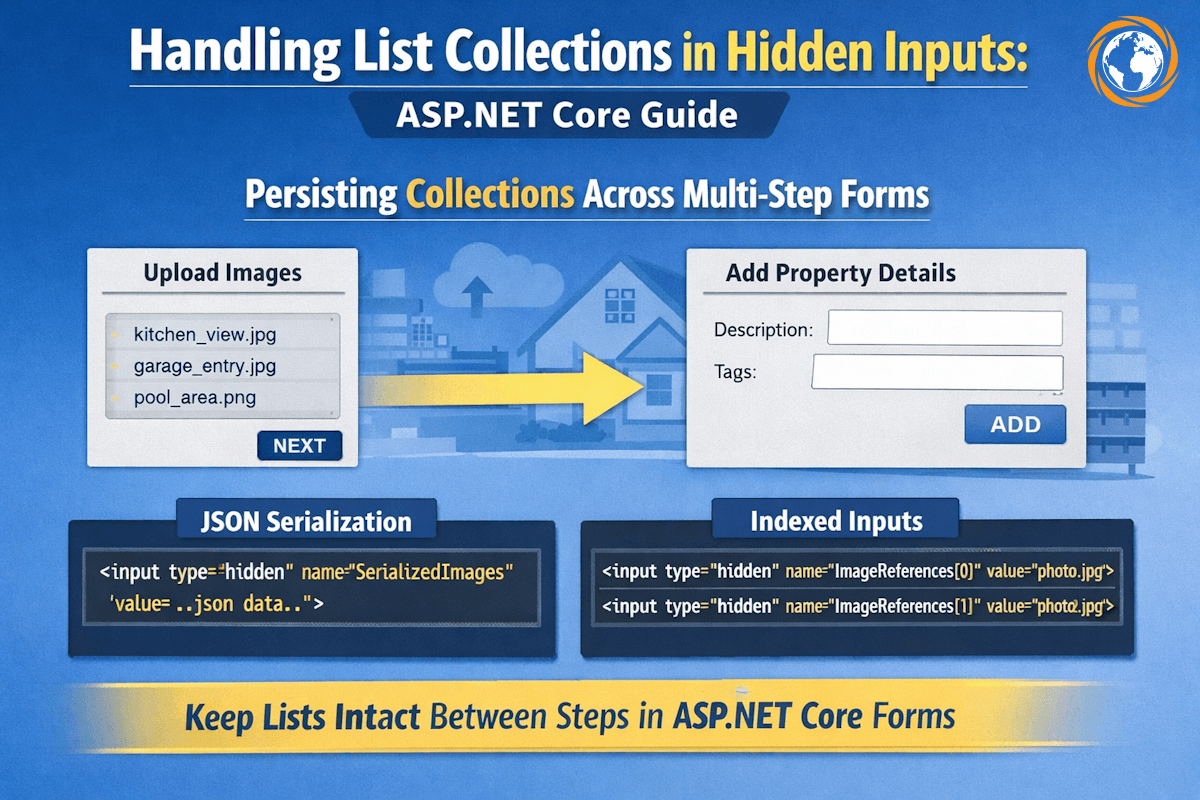
Method A: The “One Input” Solution (JSON Serialization)
If you strictly require a single hidden input, you must serialize the data manually in the view and deserialize it in the backend.
@using System.Text.Json
<!-- Serialize the list to a JSON string -->
<input type="hidden"
       name="SerializedImages"
       value="@JsonSerializer.Serialize(Model.PropertyListing.ImageReferences)" />
Backend Handling: You would then need a separate property in your PageModel to receive this string and parse it back to a list during OnPost.
Method B: The Robust Solution (Index-Based Binding)
For most enterprise applications where you want to hire dedicated ASP.NET engineers to build maintainable code, this is the preferred approach. It allows the standard List<string> property to be populated automatically on the next POST.
We loop through the collection and generate a hidden input for each index. The asp-for tag helper is smart enough to generate the correct name="Property.Images[0]..." syntax.
@for (int i = 0; i < Model.PropertyListing.ImageReferences.Count; i++)
{
    <!-- This generates name="PropertyListing.ImageReferences[0]", etc. -->
    <input type="hidden" asp-for="PropertyListing.ImageReferences[i]" />
}
Resulting HTML:
<input type="hidden" name="PropertyListing.ImageReferences[0]" value="kitchen_view.jpg" />
<input type="hidden" name="PropertyListing.ImageReferences[1]" value="garage_entry.jpg" />
When the form is submitted, the ASP.NET Core Model Binder sees the indexed names and reconstructs the List<string> automatically. No manual JSON parsing is required.
LESSONS FOR ENGINEERING TEAMS
Implementing simple state preservation features often exposes gaps in understanding framework mechanics. Here are key takeaways:
- Respect the Model Binder: Frameworks like ASP.NET Core rely on naming conventions (name attributes with indexers) to bind collections. Fighting this convention usually leads to brittle code.
- Statelessness requires planning: In HTTP, variables don’t survive page reloads. If a variable isn’t in the form, the URL, or a cookie, it is gone.
- Avoid Complex Types in Value Attributes: Never pass a full object or list to a standard HTML
valueattribute. Always decompose it into primitives (strings/ints) or serialized strings. - Security Implications: Hidden fields can be manipulated by users via “Inspect Element.” Never store pricing, permissions, or sensitive IDs in hidden fields without server-side re-validation upon submission.
- Know when to hire: If your team struggles with architectural state management in distributed systems, it may be time to hire software developer expertise to audit your frontend-backend data flow.
WRAP UP
Handling lists in hidden inputs is a common requirement in multi-step forms and wizards. While serializing data into a single input works for simple scenarios, iterating through collections to generate native input fields ensures better compatibility with ASP.NET Core’s powerful model binding system. By understanding how the framework translates HTML to C# objects, we created a robust property listing wizard that reliably preserves user data.
If you are looking to scale your engineering capacity with teams that understand these architectural nuances, contact us to discuss your project needs.
Frequently Asked Questions
Yes, but it is risky. If your data (e.g., filenames) ever contains a comma, the split logic will break. JSON is safer for serialization.
It creates a risk called "Insecure Direct Object Reference" (IDOR). A malicious user could change the filename in the hidden input to reference a file they didn't upload. Always validate that the current user owns the file referenced in the hidden input when the form is submitted.
This usually happens if the name attributes of your inputs don't match the structure the Model Binder expects. Ensure your inputs are named ListName[0], ListName[1], etc., or that your serialized string property name matches the argument in the controller.
If your application relies heavily on ViewState, Session, or complex client-side hacks to manage state, it is advisable to hire .NET developers for enterprise modernization to refactor the application into a stateless, scalable architecture.